X-Ways Forensics: 综合取证分析工具
|
X-Ways Forensics
包含WinHex的所有基本功能和一些特有功能。
具体为:
- 磁盘克隆和镜像功能,进行完整数据获取
- 可分析 RAW/dd/ISO/VHD/VHDX/VDI/VMDK
格式原始数据镜像文件中的完整目录结构,支持分段保存的镜像文件
- 可读取磁盘、RAIDs以及超过2TB大的镜像文件(超过 232
个扇区) 扇区最大为8KB
- 内置解析磁盘阵列JBOD、RAID 0、RAID 5、RAID
5EE, RAID 6, Linux 软件磁盘阵列、windows动态磁盘以及LVM2逻辑卷管理器。
- 自动识别丢失的/已删除的分区
- 支持 FAT12, FAT16, FAT32, exFAT,
TFAT, NTFS, Ext2, Ext3, Ext4, CDFS/ISO9660/Joliet, UDF 文件系统
- 支持扇区叠加分析,
例如,即使在数据损坏的情况下,也能通过更正的分区表或文件系统数据结构对文件系统进行完整解析,而不改变原始磁盘或镜像
- 察看并完整获取内存转储,并能获取虚拟内存中的运行进程
-
使用多种数据恢复技术,能快速发现需要恢复的数据,并支持碎片级数据恢复
- 文件头数据库支持GRPE检索
- 能分析20种不同类型的数据
- 通过模板查看并编辑二进制数据结构
- 数据擦除功能,可彻底清除存储介质中残留数据
-
可从磁盘或镜像文件中收集残留空间、空余空间、分区空隙以及通用文本中的信息
- 创建证据文件中的文件和目录列表
- 能够非常简单地发现并分析ADS数据(NTFS备用数据流)
- 支持多种哈希计算方法 (CRC32, MD4, ed2k,
MD5, SHA-1, SHA-256, RipeMD, ...)
- 强大的物理搜索和逻辑搜索功能,可同时搜索多个关键词
- 可以在子目录中反复查看现有文件和已删除的文件
- 自动用彩色显示NTFS文件结构
- 书签和注释
- 能在符合法证要求的Windows
FE环境中运行,比如,有限制的分类/查看
- 非常便携, U盘即插即用,无需安装,支持任何一个操作系统
- 能与F-Response
配合使用,分析远程计算机
- ...
...此外:
- 支持 HFS, HFS+/HFSJ/HFSX, XFS, Btrfs,
ReiserFS, Reiser4, UFS, UFS2, APFS, QNX, SquashFS
- 能快速获取磁盘镜像,还提供生成镜像压缩程度的选项
- 能够读写.e01 格式的证据文件
- 能创建Skeleton镜像 和Cleansed镜像 (更多信息)
-
能够拷贝相关文件至证据文件管理器文件中,如:可将相关证据文件保存至管理器中,管理并选择性的共享给不同的需求者
- 完整的案例管理功能
- 自动创建软件操作日志 (审计日志)
- 数据写保护功能,确保数据真实性
- 可以任意添加对网盘的远程分析功能(更多信息)
- 能分析、过滤所有卷影副本(但不包括重复数据),找到快照属性等
-
点击鼠标即可查看文件列表。轻松浏览文件系统的数据结构,例如,文件记录,索引记录,
$LogFile,卷影副本, FAT 目录项, Ext* inode等。
- 支持分区类型: 苹果格式, MBR, GPT (GUID),
Windows动态卷 (MBR+GPT), LVM2 (MBR+GPT), 未分区 (软盘/大容量软盘)
- 能对Windows 2000 , XP , Vista,2003
server, 2008 server, Windows
7的本地内存或内存转储进行主内存分析,功能非常强大
- 显示文件的所有者,NTFS文件权限,对象ID/GUID
以及特殊属性
- 弥补 NTFS压缩时所造成的数据丢失和
文件雕复时的Ext2/Ext3区分配逻辑
-
前后目录和多个步骤之间可以快速切换、并可快速导航回到排序选项、过滤器激活(停止)、选择的界面
- 内置缩略图图片浏览
- 内置日历浏览
- 自动进行文件签名、特征比对
- 内置文件预览功能,支持270种以上文件类型
- 能够直接从程序中打印相同的文件类型,该程序首页包含所有元数据
- 能查看 Windows事件日志文件 (.evt, .evtx),
Windows 快捷方式文件 (.lnk) , Windows 预读文件, $LogFile,
$UsnJrnl, 系统还原点 change.log, Windows Task Scheduler
(.job), $EFS LUS, INFO2, 系统还原点change.log.1,
wtmp/utmp/btmp 登陆信息, MacOS X kcpassword, AOL-PFC,
Outlook NK2 自动完成, Outlook WAB 地址簿, Internet Explorer
浏览记录 (a.k.a. RecoveryStore), Internet Explorer
index.dat 历史和浏览器缓存数据库 , SQLite数据库例如Firefox 历史记录,
Firefox 下载, Firefox 表单历史, Firefox 签名, Chrome
cookies, Chrome历史归档, Chrome 历史, Chrome 登陆信息, Chrome
网络数据, Safari 缓存, Safari feeds, Skype
的main.db数据库(包括联系人和文件传输记录, ...
- 在可用空间或虚拟文件中的闲置空间中收集Internet
Explorer历史记录和浏览器缓存 index.dat
- 能从各种类型的文件中提取元数据和内部生成的时间戳,例如: MS
Office, OpenOffice, StarOffice, HTML, MDI, PDF, RTF,
WRI, AOL PFC, ASF, WMV, WMA, MOV, AVI, WAV, MP4,
3GP, M4V, M4A, JPEG, BMP, THM, TIFF, GIF, PNG, GZ,
ZIP, PF, IE cookies, DMP memory dumps, old hiberfil.sys,
PNF, SHD & SPL printer spool, tracking.log, .mdb MS
Access database, manifest.mbdx/.mbdb iPhone 备份, ...
- 记录并追踪已浏览的文件
- 把源文件链接到外部文件,例如,原文件的翻译版、解密版或更改后的版本
- 能够分析检查抽取出的电子邮件数据,支持Outlook
(PST/OST)注, Exchange EDB, Outlook Express (DBX), AOL
PFC, Mozilla (包括 Thunderbird), generic mailbox
(mbox, Unix), MSG, EML
-
生成一个功能强大的事件列表,生成该列表的时间戳来自:所有支持的文件系统,操作系统(包括事件日志,注册表,回收站等),文件内容(例如,邮件头,exif时间戳,GPS时间戳,最后打印时间;浏览器数据库,skype
聊天记录,通话记录,文件传输记录,创建的账户信息……)
-
在分析中引入时间的纬度,按照时间顺序展示事件发展延伸的整个过程。在时间线中,事件以图形显示,可方便地查看某活动在哪个时间段活跃,哪个时间段不活跃。只需点击鼠标即可快速过滤某个时间段的事件
- 拥有基于签名和专门算法的文件类型自动验证功能
- 可标记文件,并将所标记的文件添加至自定义案件报告中
- 自动生成HTML格式案件报告,可以用Word查看并编辑
- 案件报告中可关联文件注释或过滤信息
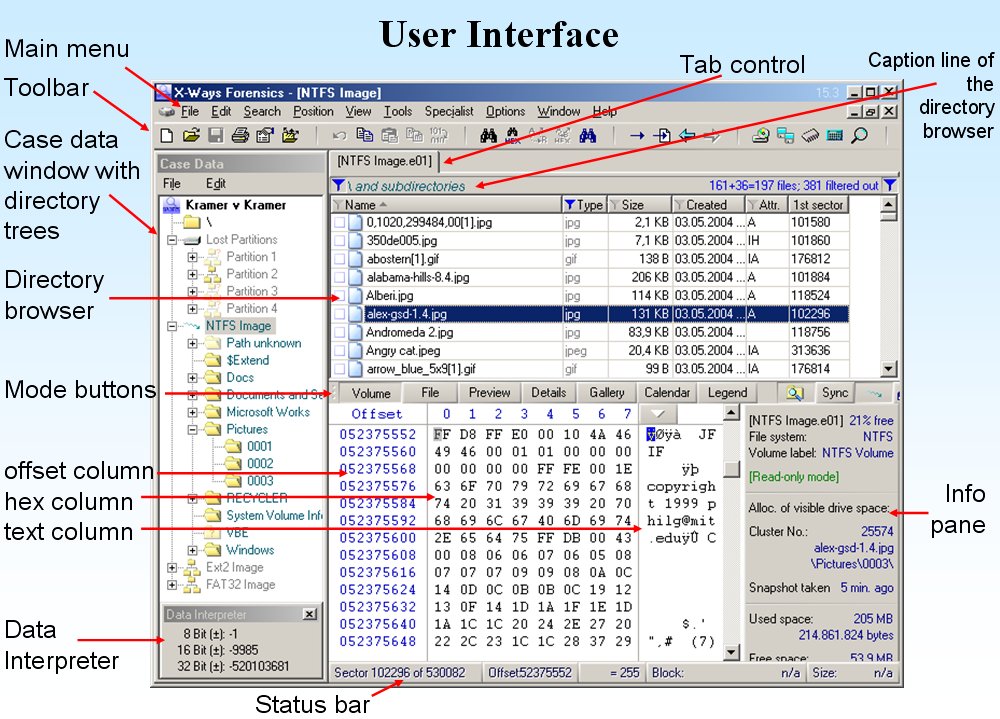
- 软件窗口左侧显示目录数结构,能够浏览并标记相关目录及子目录
- 在扇区视图模式下,可同步显示对应扇区的文件和目录
-
强大的动态过滤功能,能以文件类型、哈希库、时间、文件大小、注释、报告表等方式组合进行文件过滤
- 通过递归浏览功能,同时显示所有目录下的文件和删除数据
-
能从硬盘或者硬盘镜像中复制文件,内容可包含相应文件的完整路径,还可包含或排除文件闲置区域的数据,或将文件闲置区域的数据单独导出或全部导出。
- 自动识别加密的MS Office 和PDF文件
- 能从其他任何类型的文件中提取几乎任何一种嵌入式的文件(包括图片),
从 JPEGs和thumbcaches中提取缩略图,从跳转列表中提取 .lnk 快捷方式 ,
从Windows.edb中提取各种数据,从SQLite中提取浏览器缓存、 PLists和表单记录, 从
OLE2 和 PDF 文档中提取各种数据, ...
-
肤色图片检测功能,(根据肤色比例,以图片集方式排序,加速对儿童色情图片、黑白图片的搜索)
- 检测黑白或灰度的图片,这可能是扫描到的文件或数字化存储的传真
- 能检测到可以用OCR识别的 PDF 文档
- 能通过MPlayer或Forensic
Framer,根据用户自定义的时间间隔,从视频文件中提取静态图像,这样就能在必须查看不恰当或非法内容时大大减少要查看的数据
- 内置 Windows 注册表查看器(支持所有 Windows
版本),并自动生成注册表报告
- 能够以目录方式逐级浏览压缩文件中内容
- 易用的逻辑搜索功能,可在所有文件、选中文件和压缩文件、PDF,
HTML, EML, ..., 等类型文件中进行搜索, 可选项有: GREP,
用户自定义的“全字匹配”。
-
强大的搜索及搜索结果预览功能,支持关键字临近的上下文预览。如:可搜索Documents and
Settings目录下,最后访问时间为2004年,包含关键词A, B, D 的doc和ppt文件
- 在Unicode 和各种代码页中进行搜索和索引
- 高度灵活的索引算法,并可在索引结果中搜索固定复合词
- AND ,fuzzy AND,NEAR +和 –
逻辑运算符组合使用,搜索结果
- 能将搜索结果导出为HTML,并高亮显示文件内容以及文件元数据
- 可检测并排除硬盘HPA区域和ATA加密硬盘保护区域,并连续标注
(under Windows XP)
- 依据内部哈希库,可以快速定位特定类型文件
- 能够导入 NSRL RDS 2.x, HashKeeper
和ILook格式的哈希库
- 可创立用户专用哈希集
- 能够解压缩整个hiberfil.sys文件和单独的xpress 块
- X-Tensions API
(编程接口) ,添加您自己的功能或者现有的功能
- 无需设置并链接复杂的数据库,避免了竞争产品无法再次打开你的案件的风险
- Artificial intelligence to detect photo content
automatically, identify simiilar photos and find
relevant known faces in photos (Excire Forensics)
- 分析外部程序的界面,例如 PhotoDNA (for law enforcement
only), 能识别已知的图片(即使图片以不同格式保存或已经改动)并把图片的类别(“CP”,
“relevant”, “irrelevant”)报告给 X-Ways Forensics
- ...please see the English
version of this page for a more up-to-date
feature listing...
X-Ways Forensics 数据分析软件具有非常合理的价格。中国用户订购软件后,将收到安装光盘及日后升级下载链接。X-Ways
Forensics 还支持:  

  。X-Ways Forensics
须配合本地狗或网络狗才能使用 (dongle,
network dongle).
可为计算机水平较低的调查员设计简化用户界面,可作为证据文件察看器,或作为一个案件调查、文件分析、创建报告的强大平台。价格仅是完全版的一半。
更多信息。 。X-Ways Forensics
须配合本地狗或网络狗才能使用 (dongle,
network dongle).
可为计算机水平较低的调查员设计简化用户界面,可作为证据文件察看器,或作为一个案件调查、文件分析、创建报告的强大平台。价格仅是完全版的一半。
更多信息。
中国经销商:
CFLab
软件缩略图
如何成为X-Ways Forensics
金牌用户.
X-Ways Forensics 和 WinHex 的区别
Forensics and WinHex with a forensic license
*Limitations under Windows Vista and later: Physical
RAM cannot be opened. Unable to write sectors on the partitions that
contain Windows and WinHex.
Old Quick Start Guide Videos
|